
Blog
Why Is Your Phone Not Charging? Common Causes and Repair Solutions

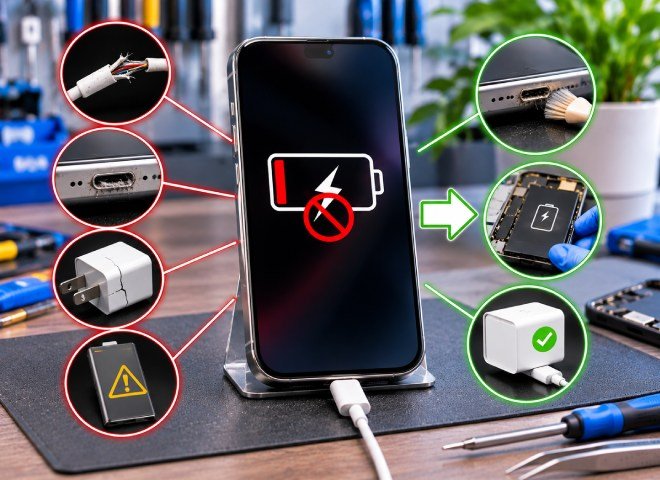
You plug your phone into the charger, expecting the battery percentage to increase, but nothing happens. Perhaps the charging symbol appears and disappears, or your phone only charges when you hold the cable at a particular angle. In some cases, the battery charges so slowly that it barely increases, even after being connected for hours.
Charging problems can be frustrating because smartphones are an essential part of everyday life. Whether you use your phone for work, communication, navigation or entertainment, a device that refuses to charge can quickly become a serious inconvenience.
The good news is that a phone that is not charging does not always need an expensive repair. Sometimes, the problem is caused by a damaged cable, a faulty adapter or dirt inside the charging port. Other situations may require professional inspection or a charging port replacement.
If you are experiencing these problems, this guide explains the common reasons your phone may not be charging, how to identify the cause and when to look for professional Phone Charging Port Repair in Bristol.
Why Is My Phone Not Charging?
There are several reasons why a smartphone may stop charging properly. Some problems are relatively simple to resolve, while others involve damaged hardware or internal components.
Before assuming that your phone needs repairing, it is worth understanding the possible causes.
1. Your Charging Cable May Be Damaged
A damaged charging cable is one of the most common reasons a phone stops charging.
Charging cables are frequently bent, twisted and pulled during everyday use. Over time, the internal wires can become damaged, even if the outside of the cable looks perfectly normal.
You may notice problems such as:
- Your phone only charges occasionally.
- Charging stops when the cable moves.
- The charging connection repeatedly disconnects.
- The cable feels loose or damaged near the connector.
Try using a compatible, undamaged charging cable to see whether the problem continues.
Always use a suitable charging accessory from a reliable manufacturer. Avoid cables with exposed wires or damaged connectors.
2. Your Phone Charging Port May Be Dirty
Another common reason for a phone charging port not working is the accumulation of dust, lint and other small particles.
If you regularly carry your phone in your pocket, handbag or backpack, debris can gradually collect inside the charging port.
This buildup may prevent the charging cable from connecting properly.
Common signs include:
- The charging cable does not fit securely.
- Your phone charges only at certain angles.
- Charging repeatedly disconnects.
- The cable feels as though it cannot go fully into the port.
If you suspect dirt inside the charging port, avoid inserting metal objects, needles or other sharp tools. These can damage the internal connectors.
If the port appears blocked, a professional technician can inspect and clean it safely.
3. Your Charging Port May Be Physically Damaged
Charging ports experience regular use, which makes them vulnerable to wear and tear.
Repeatedly inserting and removing charging cables can eventually damage the internal connectors.
Accidental pulling, impact or using an incompatible connector can also contribute to charging port damage.
You may need professional phone charging port repair if:
- Your phone does not recognise the charger.
- The cable feels unusually loose.
- Charging works intermittently.
- The charging port looks visibly damaged.
- Multiple compatible cables produce the same problem.
Depending on the phone model and the extent of the damage, the technician may recommend port cleaning, component-level repair or a complete mobile charging port replacement.
4. Your iPhone Is Not Charging Because of a Software Problem
Sometimes, an iPhone not charging properly is not caused by damaged hardware.
Temporary software issues can interfere with charging behaviour, battery readings or device performance.
Try these basic troubleshooting steps:
- Restart your iPhone.
- Check for available iOS updates.
- Try a compatible charging cable and adapter.
- Check the charging port for visible debris.
- Allow the device to cool down if it has become hot.
Some iPhones may also display a liquid-detection warning when moisture is detected in the charging connector.
If this happens, disconnect the cable and allow the connector to dry naturally. Do not use heat or insert objects into the port.
If the problem continues, arrange a professional inspection.
5. Your Samsung Phone Is Not Charging Properly
Samsung smartphones can also experience charging problems caused by damaged ports, faulty cables, software issues or battery deterioration.
If your Samsung phone is not charging, start by checking the charging accessories.
You can also try restarting your device and checking for software updates.
Depending on your Samsung model, you may be able to access battery and charging diagnostics through Samsung Members.
Other warning signs that may indicate a hardware problem include:
- The phone does not recognise compatible chargers.
- Charging repeatedly starts and stops.
- The USB connection feels loose.
- The device charges extremely slowly.
- A moisture warning appears despite no obvious water exposure.
If these problems continue, a technician can inspect the charging port, battery and associated charging components.
For customers searching for Samsung charging port repair in Bristol, it is important to choose a repair provider familiar with the particular Samsung model.
6. Your Phone Is Charging Too Slowly
A phone charging slowly can be just as frustrating as a device that does not charge at all.
For example, you might connect your phone before going to bed and discover that it has only gained a small amount of battery overnight.
Several factors can contribute to slow charging:
Low-power charging adapter: An adapter with insufficient output may charge your phone more slowly than expected.
Damaged cable: A worn or incompatible cable can affect charging performance.
Dirty charging port: Debris may prevent a proper connection.
Background applications: Heavy activity can increase power consumption while charging.
Battery deterioration: An ageing battery may experience reduced performance.
Temperature: Smartphones may automatically reduce charging speed when they become too hot or too cold.
Try a suitable charging adapter and cable first. If the issue continues, professional diagnosis can help identify whether the problem is related to the charging port, battery or internal charging system.
7. Your Phone Has Water or Moisture Damage
Water and electronic components do not mix well. Even a small amount of moisture entering a charging port can interfere with the connection.
Modern smartphones may display a moisture warning and temporarily prevent wired charging to reduce the risk of damage.
If your phone has been exposed to water:
- Disconnect the charging cable immediately.
- Do not attempt to charge the device.
- Avoid using a hairdryer or applying direct heat.
- Do not insert cotton buds or sharp objects into the charging port.
- Arrange professional inspection if the warning persists or the device has suffered liquid exposure.
Do not ignore repeated moisture warnings. Internal corrosion can cause further problems even if the phone initially appears to work normally.
How to Fix a Phone That Is Not Charging
Before booking a repair, there are several simple checks you can perform at home.
Step 1: Try Another Charging Cable
Use a compatible cable that you know works with another device. If your phone starts charging normally, the original cable may be faulty.
Step 2: Check the Charging Adapter
A damaged or unsuitable adapter can prevent your phone from receiving sufficient power. Try a compatible adapter from a reliable manufacturer.
Step 3: Restart Your Phone
Temporary software problems can sometimes interfere with charging. Restarting your device may resolve these issues.
Step 4: Inspect the Charging Port
Look for visible dust, lint or physical damage. Do not insert metal tools or force anything into the connector.
Step 5: Check for Moisture Warnings
If your phone displays a liquid-detection warning, disconnect the charger and follow the manufacturer’s drying guidance.
Step 6: Get Professional Help
If your phone still refuses to charge after these checks, the issue may involve damaged hardware.
A professional technician can inspect the charging port, battery and internal components to identify the actual cause.
When Do You Need a Mobile Charging Port Replacement?
Not every charging issue requires replacing the entire charging port.
In some cases, professional cleaning or a smaller repair may be enough to restore the connection.
However, replacement may be necessary when:
- The charging connector is physically broken.
- Internal port contacts are damaged.
- The cable repeatedly disconnects.
- The phone does not recognise compatible chargers.
- Previous cleaning and basic troubleshooting have not resolved the problem.
The repair process depends on the device design.
Some smartphone models have charging ports that can be replaced as separate components, while others may require more involved repairs.
A proper inspection helps determine the most suitable and cost-effective solution.
How Much Does Phone Charging Port Repair Cost in Bristol?
The cost of phone charging port repair in Bristol depends on the manufacturer, device model and extent of the damage.
A straightforward port cleaning may cost less than replacing a damaged charging connector. Some devices may also require additional repairs if internal components have been affected.
The main factors influencing repair prices include:
- iPhone or Samsung model.
- Charging port type and design.
- Availability of replacement parts.
- Whether cleaning, repair or replacement is required.
- Labour and repair complexity.
- Warranty offered with the repair.
For an accurate price, provide the exact phone model and explain the charging problem when contacting a repair provider.
It is also worth asking whether the quoted price includes parts, labour and any applicable repair warranty.
Where to Get Phone Charging Port Repair in Bristol?
If your phone is not charging properly and basic troubleshooting has not helped, finding a reliable local repair service is the next step.
At Bristol Phones & Tech Specialists, customers can discuss mobile phone charging problems and explore suitable repair options.
Whether you have an iPhone that refuses to charge, a Samsung device with an unreliable charging connection or another smartphone with a damaged charging port, identifying the cause is important before replacing any components.
A professional assessment can help determine whether your phone needs:
- Charging port cleaning.
- Charging port repair.
- Mobile charging port replacement.
- Battery inspection or replacement.
- Further internal charging system diagnosis.
Before visiting, contact the shop to discuss your phone model, explain the symptoms and check parts availability.
Getting the correct diagnosis can help avoid unnecessary repairs and additional expenses.
Frequently Asked Questions
1. Why is my phone not charging even when plugged in?
The problem could be caused by a damaged charging cable, faulty adapter, dirty charging port, software issue or internal hardware fault. Testing compatible charging accessories is a good first step.
2. How do I know if my phone charging port is damaged?
Common signs include a loose charging connection, intermittent charging, failure to recognise compatible cables and visible damage inside the port. A technician can confirm whether cleaning or replacement is needed.
3. Can a phone charging port be repaired?
Yes. Depending on the model and damage, the charging port may be cleaned, repaired or replaced. The appropriate option depends on the condition of the connector and internal components.
4. Why is my iPhone not charging but showing the charging symbol?
This can happen because of a faulty cable, charging accessory, software issue or battery problem. If the battery percentage does not increase, the device may need further inspection.
5. Why is my Samsung phone charging slowly?
Possible causes include an unsuitable adapter, damaged cable, dirty charging port, high device temperature or battery deterioration. Checking the charging accessories and battery condition can help identify the issue.
6. How long does charging port replacement take?
Repair time depends on the phone model, replacement part availability and complexity of the work. Some repairs can be completed within a few hours, while more complicated jobs may take longer.
7. Will charging port replacement delete my phone data?
A standard charging port replacement does not normally erase personal data. However, backing up your important information before any repair is always recommended.
Final Thoughts
A phone that refuses to charge can disrupt your entire day, but the problem is not always as serious as it first appears. A damaged cable, blocked charging port or unsuitable adapter may be responsible.
However, if your phone continues to charge intermittently, refuses to recognise compatible chargers or takes unusually long to reach a full battery, professional diagnosis is worthwhile.
If you are looking for Phone Charging Port Repair in Bristol, contact Bristol Phones & Tech Specialists to discuss your device and find out which repair solution is suitable.
Getting the problem checked early can help prevent further damage and get your phone back to charging reliably.